
One of my activities that I’m doing for self development is a game I’m making in Unreal Engine 5. When developing, I try to apply as many techniques that interest me as possible. One such technique is procedural generation. In the project I use procedural generation to get different level variations by mixing level presets and slightly varying parameters and it simplifies the development process a lot. Especially it reduces the time cost of creating levels. These are not the only advantages of this technique, but the post is titled “Bowyer Watson Triangulation” so let’s get to it!
WARNING! I’m not writing these posts as some sort of tutorial, but for myself, to document my progress (exactly like my mistakes). So this is purely my approach and my understanding of the problem. However, if you have somehow seen my posts and found mistakes there, I will be very grateful for your criticism!
Bowyer-Watson Triangulation is an algorithm used to compute the Delaunay Triangulation of a set of points in 2D space. Delaunay Triangulation is a geometric structure that divides a set of points in 2D space into non-overlapping triangles, satisfying the Delaunay condition:
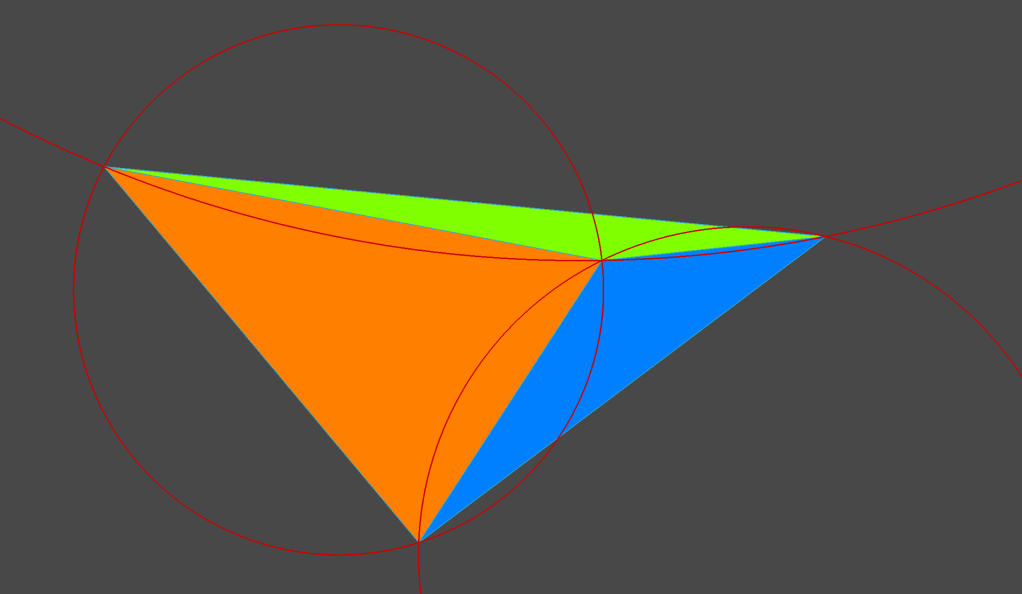
- No point in the set lies inside the circumcircle (circle passing through all three vertices) of any triangle in the triangulation.
Here is a small example that I made in a CAD program:
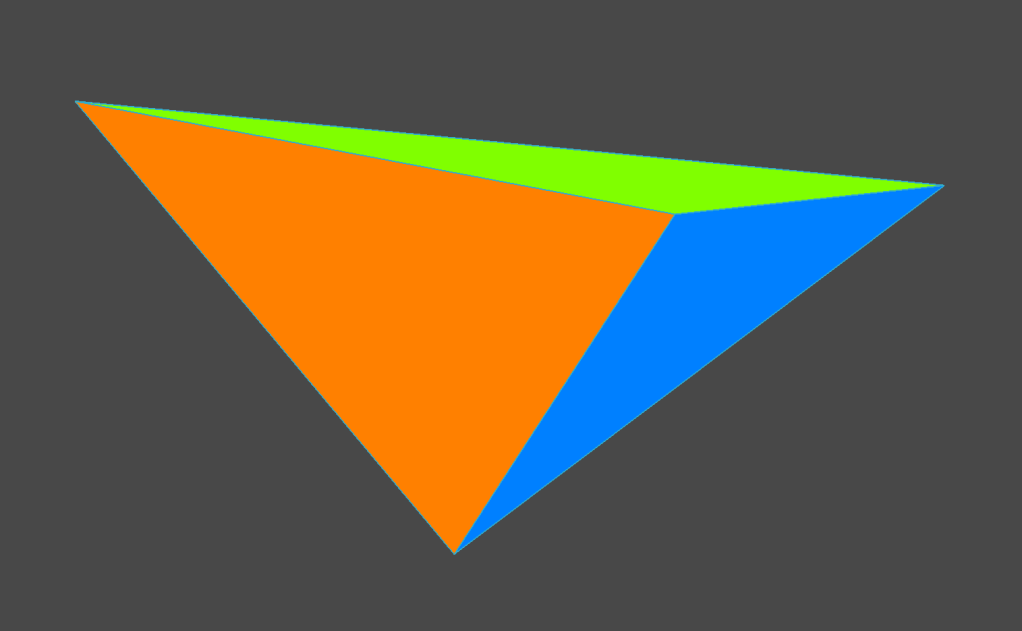
Notice that if you draw a circle through each point of each triangle, then none of those points will lie inside those circles:
So, now that it is clear what we need to get, let’s go to the algorithm itself. Here’s what it looks like:
- Initialization: Start with a “super-triangle” that encompasses all the points in the dataset.
- Insertion: Add points one at a time to the triangulation.
- Validation: For each inserted point, identify all triangles whose circumcircles contain the new point (these triangles are invalid in the Delaunay sense).
- Removal: Remove the invalid triangles, forming a “cavity.”
- Re-triangulation: Refill the cavity with new triangles that connect the new point to the edges of the cavity boundary.
- Completion: Once all points are processed, remove the triangles that share vertices with the initial “super-triangle.”
It doesn’t look very clear at first. At least for me the first time, it looked very confusing. But I did this algorithm several times in the CAD program to get used to it, and after several attempts it became very clear. Since I don’t have a lot of time to do some detailed explanation with frame-by-frame animation of the process, I will gladly recommend someone who did it for me! He has a great animation with how this algorithm works. And now let’s move on to the code I used for UE5.
The first thing we need is a date to interact with. I did it this way:
USTRUCT(BlueprintType)
struct YOUR_GAME_API FBWTriangle {
	GENERATED_USTRUCT_BODY()

	UPROPERTY(EditAnywhere, BlueprintReadWrite)
	int isBad;

	UPROPERTY(EditAnywhere, BlueprintReadWrite)
	TArray<FVector> points;

	FBWTriangle() {
		isBad = 0;
		points = { };
	}
};
USTRUCT(BlueprintType)
struct YOUR_GAME_API FBWEdge {
	GENERATED_USTRUCT_BODY()

	UPROPERTY(EditAnywhere, BlueprintReadWrite)
	TArray<FVector> points;

	UPROPERTY(EditAnywhere, BlueprintReadWrite)
	int weight;

	FBWEdge() {
		points = { };
		weight = 0;
	}
};

struct CompareEdge {
    bool operator()(const FBWEdge& e1, const FBWEdge& e2) {
        return e1.weight > e2.weight;
    }
};
I want to operate on edges and triangles. Therefore, I have defined two separate structures for them. I want to use these structures themselves for a dataset that I want to view directly from the editor. So I make a class in which I store these structures:
UCLASS()
class YOUR_GAME_API UkbProcGenData : public UDataAsset {
	GENERATED_BODY()

public:
	int												randomNum = 0;

    UPROPERTY(EditAnywhere, BlueprintReadWrite, Category = "ProcedureGenData|GenerationPoints")
    TArray<FVector>									generationPoints;

    UPROPERTY(EditAnywhere, BlueprintReadWrite, Category = "ProcedureGenData|Triangles")
    TArray<FBWTriangle>								bwTriangles;

	UPROPERTY(EditAnywhere, BlueprintReadWrite, Category = "ProcedureGenData|Edges")
	TArray<FBWEdge>									bwEdges;

	UPROPERTY(EditAnywhere, BlueprintReadWrite, Category = "ProcedureGenData|MST")
	TArray<FBWEdge>									MST;

	UPROPERTY(EditAnywhere, BlueprintReadWrite, Category = "ProcedureGenData|ResultEdges")
	TArray<FBWEdge>									resultEdges;

	TArray<TArray<int>>								map;
};
As you may have noticed there are fields in this class that are not directly related to the triangulation process, such as map, MST, randomNum, etc. These fields will be discussed in the next posts, which will cover other steps of the procedural generation module.
And now let’s finally get to the triangulation code itself:
bool AkbProceduralGenerator::BowyerWatsonTriangulation() {
	if (!procGenDataAsset->bwTriangles.IsEmpty())
		procGenDataAsset->bwTriangles.Empty();

	if (!procGenDataAsset->bwEdges.IsEmpty())
		procGenDataAsset->bwEdges.Empty();

	if (!CanTriangulate()) {
		UE_LOG(LogTemp, Warning, TEXT("Cannot triangulate"));
		return false;
	}

	FVector location = GetActorLocation();
	int minX = procGenDataAsset->generationPoints[0].X;
	int minY = procGenDataAsset->generationPoints[0].Y;
	int maxX = minX;
	int maxY = minY;
	for (int i = 0; i < procGenDataAsset->generationPoints.Num(); i++) {
		if (procGenDataAsset->generationPoints[i].X < minX) minX = procGenDataAsset->generationPoints[i].X;
		if (procGenDataAsset->generationPoints[i].Y < minY) minY = procGenDataAsset->generationPoints[i].Y;
		if (procGenDataAsset->generationPoints[i].X > maxX) maxX = procGenDataAsset->generationPoints[i].X;
		if (procGenDataAsset->generationPoints[i].Y > maxY) maxY = procGenDataAsset->generationPoints[i].Y;
	}

	int deltaX = maxX - minX;
	int deltaY = maxY - minY;
	int deltaMax = FMath::Max(deltaX, deltaY);
	int midX = (minX + maxX) / 2;
	int midY = (minY + maxY) / 2;

	procGenDataAsset->generationPoints.Add(FVector(midX - 2 * deltaMax, midY - deltaMax, 0.f/*location.Z*/));
	procGenDataAsset->generationPoints.Add(FVector(midX + 2 * deltaMax, midY - deltaMax, 0.f/*location.Z*/));
	procGenDataAsset->generationPoints.Add(FVector(midX, midY + 2 * deltaMax, 0.f/*location.Z*/));

	auto superTriangle = FBWTriangle();
	superTriangle.points.Add(procGenDataAsset->generationPoints[rnum]);
	superTriangle.points.Add(procGenDataAsset->generationPoints[rnum + 1]);
	superTriangle.points.Add(procGenDataAsset->generationPoints[rnum + 2]);
	procGenDataAsset->bwTriangles.Add(superTriangle);

	for (int i = 0; i < rnum; i++) {
		if (!procGenDataAsset->bwEdges.IsEmpty()) {
			procGenDataAsset->bwEdges.Empty();
		}

		// if triangle circumcircle contains a point, remove the triangle and add its edges to the edge list
		for (int j = 0; j < procGenDataAsset->bwTriangles.Num(); j++) {
			if (IsPointInCircumcircle(procGenDataAsset->generationPoints[i], procGenDataAsset->bwTriangles[j])) {
				AddEdge(procGenDataAsset->bwTriangles[j].points[0], procGenDataAsset->bwTriangles[j].points[1]);
				AddEdge(procGenDataAsset->bwTriangles[j].points[1], procGenDataAsset->bwTriangles[j].points[2]);
				AddEdge(procGenDataAsset->bwTriangles[j].points[2], procGenDataAsset->bwTriangles[j].points[0]);
			}
		}

		// remove bad triangles
		for (int j = procGenDataAsset->bwTriangles.Num() - 1; j >= 0; j--) {
			if (procGenDataAsset->bwTriangles[j].isBad) {
				procGenDataAsset->bwTriangles.RemoveAt(j);
			}
		}

		// make new triangles from the edges
		for (int j = 0; j < procGenDataAsset->bwEdges.Num(); j++) {
			auto newTriangle = FBWTriangle();
			newTriangle.points.Add(procGenDataAsset->bwEdges[j].points[0]);
			newTriangle.points.Add(procGenDataAsset->bwEdges[j].points[1]);
			newTriangle.points.Add(procGenDataAsset->generationPoints[i]);
			newTriangle.isBad = 0;
			procGenDataAsset->bwTriangles.Add(newTriangle);
		}
	}

	for (int i = procGenDataAsset->bwTriangles.Num() - 1; i >= 0; i--) {
		const FBWTriangle& triangle = procGenDataAsset->bwTriangles[i];
		if (triangle.points.Contains(procGenDataAsset->generationPoints[rnum]) ||
			triangle.points.Contains(procGenDataAsset->generationPoints[rnum + 1]) ||
			triangle.points.Contains(procGenDataAsset->generationPoints[rnum + 2])) {
			procGenDataAsset->bwTriangles.RemoveAt(i);
		}
	}

	if (procGenDataAsset->bwTriangles.IsEmpty()) {
		UE_LOG(LogTemp, Warning, TEXT("Problem in triangulation occurs"));
		return false;
	}

	return true;
}
Now let’s break down the code:
Clearing existing data
if (!procGenDataAsset->bwTriangles.IsEmpty())
    procGenDataAsset->bwTriangles.Empty();

if (!procGenDataAsset->bwEdges.IsEmpty())
    procGenDataAsset->bwEdges.Empty();
Clears any previously stored triangles and edges to start fresh.
Validation
if (!CanTriangulate()) {
    UE_LOG(LogTemp, Warning, TEXT("Cannot triangulate"));
    return false;
}
Checks whether triangulation is possible. If not, logs a warning and exits the function. For now it’s just sanity test:
bool AkbProceduralGenerator::CanTriangulate() {
	if (procGenDataAsset->generationPoints.Num() < 3) {
		UE_LOG(LogTemp, Warning, TEXT("Not enough points to triangulate"));
		return false;
	}
Determining bounds of the points
int minX = procGenDataAsset->generationPoints[0].X;
int minY = procGenDataAsset->generationPoints[0].Y;
int maxX = minX;
int maxY = minY;
for (int i = 0; i < procGenDataAsset->generationPoints.Num(); i++) {
    if (procGenDataAsset->generationPoints[i].X < minX) minX = procGenDataAsset->generationPoints[i].X;
    if (procGenDataAsset->generationPoints[i].Y < minY) minY = procGenDataAsset->generationPoints[i].Y;
    if (procGenDataAsset->generationPoints[i].X > maxX) maxX = procGenDataAsset->generationPoints[i].X;
    if (procGenDataAsset->generationPoints[i].Y > maxY) maxY = procGenDataAsset->generationPoints[i].Y;
}
Finds the minimum and maximum coordinates (minX, minY, maxX, maxY) to calculate the bounding box for the points.
Creating the super-triangle
int deltaX = maxX - minX;
int deltaY = maxY - minY;
int deltaMax = FMath::Max(deltaX, deltaY);
int midX = (minX + maxX) / 2;
int midY = (minY + maxY) / 2;

procGenDataAsset->generationPoints.Add(FVector(midX - 2 * deltaMax, midY - deltaMax, 0.f));
procGenDataAsset->generationPoints.Add(FVector(midX + 2 * deltaMax, midY - deltaMax, 0.f));
procGenDataAsset->generationPoints.Add(FVector(midX, midY + 2 * deltaMax, 0.f));
Calculates the center and size of the bounding box and creates a “super-triangle” large enough to encompass all points by adding three new vertices to the point set.
Initializing the triangulation
auto superTriangle = FBWTriangle();
superTriangle.points.Add(procGenDataAsset->generationPoints[rnum]);
superTriangle.points.Add(procGenDataAsset->generationPoints[rnum + 1]);
superTriangle.points.Add(procGenDataAsset->generationPoints[rnum + 2]);
procGenDataAsset->bwTriangles.Add(superTriangle);
Constructs the super-triangle using the newly added points and adds it to the triangulation.
For each point (in my module it’s not just points, but the number of rooms I want to spawn, so rnum)
Finding and removing bad triangles
for (int j = 0; j < procGenDataAsset->bwTriangles.Num(); j++) {
    if (IsPointInCircumcircle(procGenDataAsset->generationPoints[i], procGenDataAsset->bwTriangles[j])) {
        AddEdge(procGenDataAsset->bwTriangles[j].points[0], procGenDataAsset->bwTriangles[j].points[1]);
        AddEdge(procGenDataAsset->bwTriangles[j].points[1], procGenDataAsset->bwTriangles[j].points[2]);
        AddEdge(procGenDataAsset->bwTriangles[j].points[2], procGenDataAsset->bwTriangles[j].points[0]);
    }
}
For each triangle, checks if the new point lies inside its circumcircle. If true, the triangle is marked as “bad” and its edges are added to the edge list for re-triangulation.
AddEdge function looks like this:
void AkbProceduralGenerator::AddEdge(FVector& a, FVector& b) {
	checkf(!a.Equals(b), TEXT("AddEdge fails: two input points are the same points!"));
	for (int i = procGenDataAsset->bwEdges.Num() - 1; i >= 0; i--) {
		auto edge = procGenDataAsset->bwEdges[i];
        if ((edge.points[0] == a && edge.points[1] == b) ||
            (edge.points[0] == b && edge.points[1] == a)) {
			procGenDataAsset->bwEdges.RemoveAt(i);
			return;
        }
	}

	FBWEdge edge;
	edge.points.Add(a);
	edge.points.Add(b);
	procGenDataAsset->bwEdges.Add(edge);
}
Removing triangles marked as bad
for (int j = procGenDataAsset->bwTriangles.Num() - 1; j >= 0; j--) {
    if (procGenDataAsset->bwTriangles[j].isBad) {
        procGenDataAsset->bwTriangles.RemoveAt(j);
    }
}
Removes all bad triangles from the triangulation.
Creating new triangles
for (int j = 0; j < procGenDataAsset->bwEdges.Num(); j++) {
    auto newTriangle = FBWTriangle();
    newTriangle.points.Add(procGenDataAsset->bwEdges[j].points[0]);
    newTriangle.points.Add(procGenDataAsset->bwEdges[j].points[1]);
    newTriangle.points.Add(procGenDataAsset->generationPoints[i]);
    newTriangle.isBad = 0;
    procGenDataAsset->bwTriangles.Add(newTriangle);
}
Forms new triangles by connecting the edges of the cavity to the newly added point.
Removing triangles connected to the super-triangle
for (int i = procGenDataAsset->bwTriangles.Num() - 1; i >= 0; i--) {
    const FBWTriangle& triangle = procGenDataAsset->bwTriangles[i];
    if (triangle.points.Contains(procGenDataAsset->generationPoints[rnum]) ||
        triangle.points.Contains(procGenDataAsset->generationPoints[rnum + 1]) ||
        triangle.points.Contains(procGenDataAsset->generationPoints[rnum + 2])) {
        procGenDataAsset->bwTriangles.RemoveAt(i);
    }
}
Removes triangles that share vertices with the super-triangle, as they do not belong to the final triangulation.
Final validation
if (procGenDataAsset->bwTriangles.IsEmpty()) {
    UE_LOG(LogTemp, Warning, TEXT("Problem in triangulation occurs"));
    return false;
}
Checks if the resulting triangulation is empty, which indicates an error.
 Pozharskiy's blog
Leave a comment